
dotnetcore
Docker file for .Net Core 6
The docker file I'm using for .net core 6 projects.

dotnetcore
The docker file I'm using for .net core 6 projects.

Docker
This is the docker file I'm using to build .net core 5 projects.
.net core
This is my sample docker file I use for .net core 3.1 projects.

Docker
So this one stumped me a bit. I have my app in a built in .net core running in a docker container and was trying to get the reverse proxy to talk to the container over HTTPS. So in this post I'll walk through a few steps I&
dotnetcore
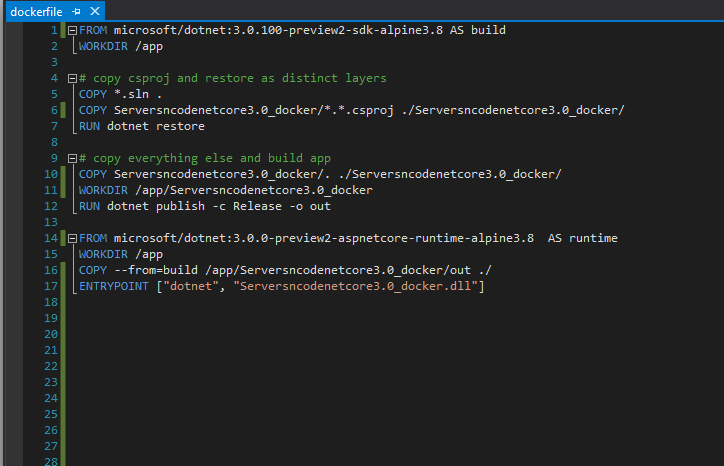
I've been moving through .Net Core and working with docker to deploy some real applications. As I've done this I've been collecting different versions of the docker file. Other posts Dockerfile for .Net Core 2.2 and Docker with .Net Core .Net Core 3.
dotnetcore
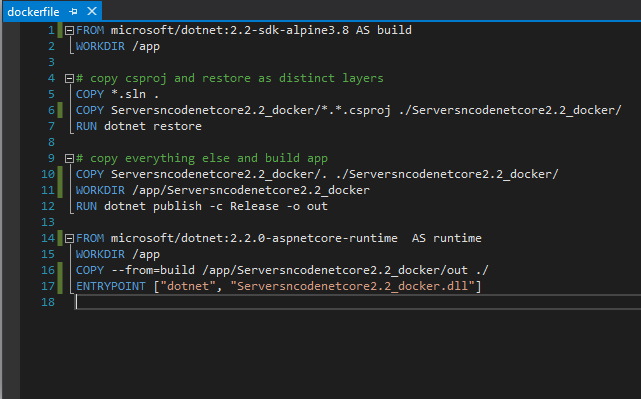
I've written before about .net core with docker and using it with .net core 2.1 But as .net core has moved forward through new versions the docker files change, this is a sample docker file for a .net core 2.2 web app. FROM microsoft/dotnet:2.
dotnet
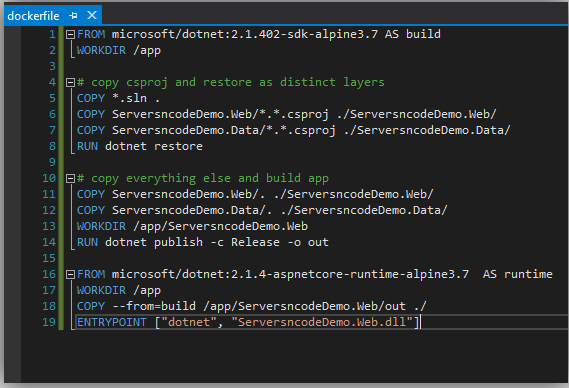
Building .net core applications into Docker containers. I've spent a bit of time lately moving some of my older applications into docker containers in dotnet core 2.0 and 2.1. I've only started exploring docker with dot net core and what we can do and
Docker
As I dig deeper and deeper into Docker. I'm finding some really useful commands that I have to keep using and reusing. As I use and learn more I will add to this guide. Docker build command docker build -t webapp . Docker Tag and Push docker tag webapp

NGINX
This post is a guide on setting the NGINX Config to work as a reverse proxy to our web application inside a docker container. When you use docker to host your web applications and services. It's handy to be able to use a reverse proxy to pass the

Docker
A quick guide to setting up Docker on a Linode Ubuntu server. As I go deeper into exploring docker and building applications and services in new ways, I wanted a post that acts as a starting point. Installing docker $ sudo apt-get update First, add the GPG key for the official

Docker
Docker What is docker Docker containers wrap up a piece of software in a complete file system that contains everything it needs to run: code, runtime, system tools, system libraries – anything you can install on a server. This guarantees that it will always run the same, regardless of the environment